By the Vertexweb team. Last reviewed .
Imagine receiving a quote from joes.plumbing.uk@gmail.com and another from joe@joesplumbing.co.uk. Both may be genuine, but the second looks established and easier to trust. A professional business email address on your own domain is one of the most affordable ways to make a small business look credible, and it keeps your communication consistent with your website.
This guide explains why it matters, how to set it up, what the technical terms mean and how to keep your email secure.
Key takeaways
- Email on your own domain looks more credible than a free webmail address.
- You need a domain and an email service, which many hosting plans include.
- SPF, DKIM and DMARC help your emails reach inboxes and prevent spoofing.
- Use strong passwords and two-step login on every mailbox.
- Choose simple, memorable names such as info@ or hello@, plus named addresses for your team.
Why a free email address costs you trust
Free addresses are fine for personal use, but customers notice. They can look temporary, they do not match your website and they are more likely to be treated with suspicion, especially when you are asking for a deposit or personal details. A domain-based address signals that you are an established business and keeps everything under your brand.
It also gives you control. If a staff member leaves, you can redirect or close their mailbox without losing your business history.
What is domain email?
Domain email simply means addresses that end with your own domain, such as info@yourbusiness.co.uk. You need two things: a domain name and an email service. Many hosting plans include webmail, which lets you read and send email in a browser as well as in apps. Our guide to choosing a domain name explains the first part.
How to set up business email, step by step
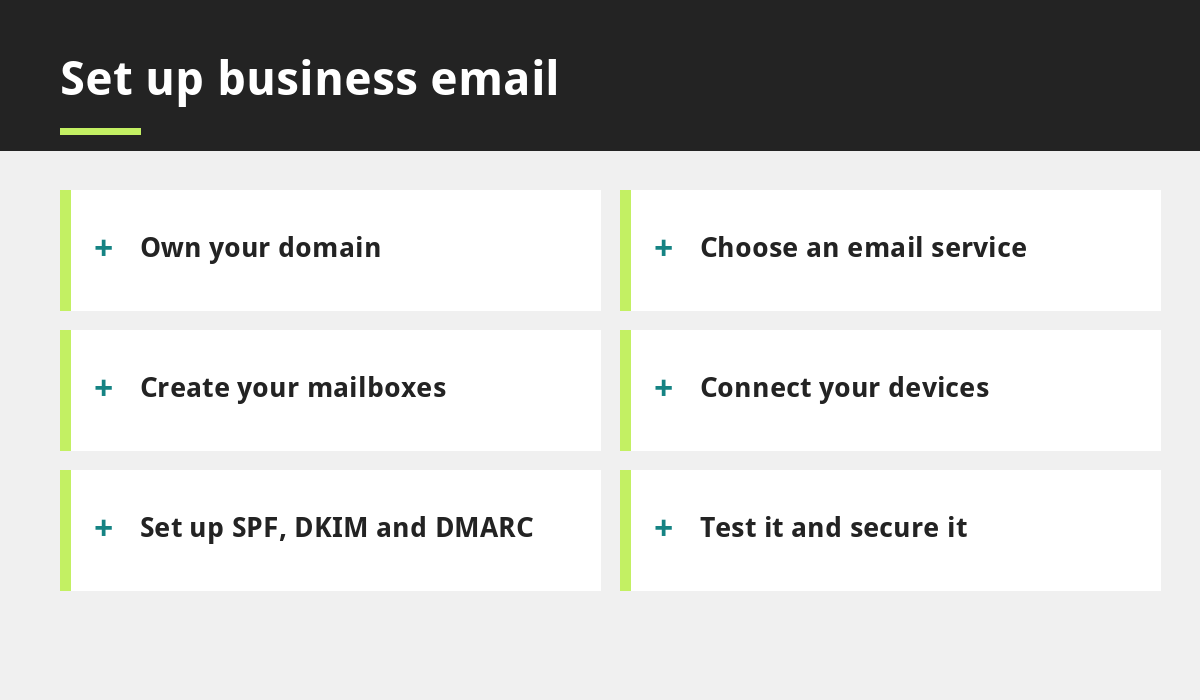
- Own your domain. Make sure it is registered in your name.
- Choose your email service. This may be included with your hosting or a separate provider.
- Create your mailboxes. Start with the addresses you need, such as info@ and one for each team member.
- Connect your devices. Add the mailbox to your phone and computer, or use webmail.
- Set up authentication. Ask your provider to help with SPF, DKIM and DMARC.
- Test. Send messages to and from a free address and check they arrive in the inbox, not spam.
Choosing good email addresses
- Shared addresses such as info@, hello@ or bookings@ suit enquiries.
- Named addresses such as sam@ build personal trust.
- Keep them short and easy to say aloud.
- Avoid numbers and underscores.
Use the same address on your website, Google Business Profile and business cards so details match everywhere. Our Google Business Profile guide explains why consistency matters.
SPF, DKIM and DMARC in plain English
These three settings help prove that email claiming to come from your domain really does. SPF lists which servers may send mail for you. DKIM adds a digital signature to your messages. DMARC tells receiving servers what to do if a message fails those checks and sends you reports. Together they reduce the chance of your emails landing in spam and of criminals pretending to be you. Your provider can usually add them for you.
Keep your email secure
- Use a strong, unique password for each mailbox.
- Turn on two-step login where offered.
- Be careful with unexpected links and attachments.
- Remove mailboxes for people who have left.
- Back up important messages.
If you collect personal details by email, handle them in line with UK GDPR. See our overview of GDPR and cookie compliance for small business websites.
Business email with our launch offer
Our £299 a year launch offer for the first 20 customers includes three professional webmail accounts, along with a free domain name and hosting for the first year. That means your website and your email can share the same professional address from day one.
Common mistakes to avoid
- Using a free address on business cards and quotes.
- Letting the domain expire, which stops email too.
- Sharing one password between several people.
- Ignoring spam and bounce problems.
- Forgetting to set up SPF, DKIM and DMARC.
Pair good email with a strong email routine. Our email marketing tips explain how to write messages people read.
Moving from a free address without losing messages
Switching does not have to mean starting again. Set up your new address first, then send a short note to your contacts to say you have moved. Ask your provider whether you can forward mail from the old address for a while, and update your website, Google Business Profile, social profiles, invoices and signatures. Keep the old account open until you are sure nothing important is still arriving there. A gradual change keeps customers confident and avoids lost enquiries.
Common questions
Can I keep using Gmail with my own domain?
Yes. Many providers let you use your domain with familiar apps. Your host or provider can explain the options.
How many email addresses does a small business need?
Most start with two or three: a general address such as info@ and one per key team member. You can add more later.
Final thoughts
A professional business email address is a small change that makes a big difference to trust. Use your own domain, choose clear names, set up authentication and keep every mailbox secure.
If you would like help setting up email with your website, talk to our team or see our small business website design service.
Related reading
- Domain, Hosting and SSL Explained
- How to Choose a Domain Name for Your UK Business
- Email Marketing Tips That Keep Subscribers Engaged
- GDPR and Cookie Compliance for Small Business Websites
- Our £299 a year launch offer
Launch offer for UK small businesses. Get a professional website for just £299 a year, with free domain, hosting and SSL for the first year. Only the first 20 customers.