
By the Vertexweb team. Last reviewed October 2026.
Gift Aid on online donations lets a UK charity claim an extra 25p from HMRC for every £1 a taxpayer gives, at no cost to the donor. If your donation form does not ask for Gift Aid properly, you are leaving that money unclaimed every time someone gives.
This guide explains how Gift Aid online donations work, what your donation form must say, how to choose a platform or plugin, which records to keep and how to make your claim through Charities Online. It is written for small charities, CASCs and community organisations that want a simple, compliant set-up.
Key takeaways
- Gift Aid adds 25p to every £1 donated by a UK taxpayer, claimed from HMRC.
- An online tick box works as a Gift Aid declaration if it includes the right wording and details.
- You need the donor’s full name, home address and postcode, plus a clear tax statement.
- Keep declaration records for 6 years after the most recent donation you claimed on.
- Choose a donation tool that captures declarations and exports a claim file for Charities Online.
How Gift Aid works
When a UK taxpayer donates, they have already paid income tax on that money. Gift Aid lets the charity reclaim the basic rate tax. At the 20% basic rate, a £10 donation becomes £12.50 for your charity. Higher rate taxpayers can claim extra relief for themselves through their tax return, but that does not change what the charity receives.
To claim, your organisation must be recognised by HMRC as a charity or Community Amateur Sports Club (CASC) and registered for Charities Online. You also need a valid declaration from each donor.
What an online Gift Aid declaration must include
HMRC does not require a paper form. A declaration made through a website, app or text is fine, as long as it contains the right information. According to HMRC’s guidance on Gift Aid declarations, it must include:
- The name of your charity or CASC.
- The donor’s full name.
- The donor’s home address, including postcode (or a “non-UK donor” statement if they live abroad).
- A description of the gift, for example “this donation and any I make in the future or have made in the past 4 years”.
- A statement that the donor wants Gift Aid claimed and has paid enough Income Tax or Capital Gains Tax to cover it.
A common wording for the tick box is: “Yes, I am a UK taxpayer and would like [Charity name] to treat this donation and any donations I make in the future or have made in the past 4 years as Gift Aid donations. I understand that if I pay less Income Tax and/or Capital Gains Tax than the amount of Gift Aid claimed on all my donations in that tax year it is my responsibility to pay any difference.”
How to add Gift Aid to your donation form
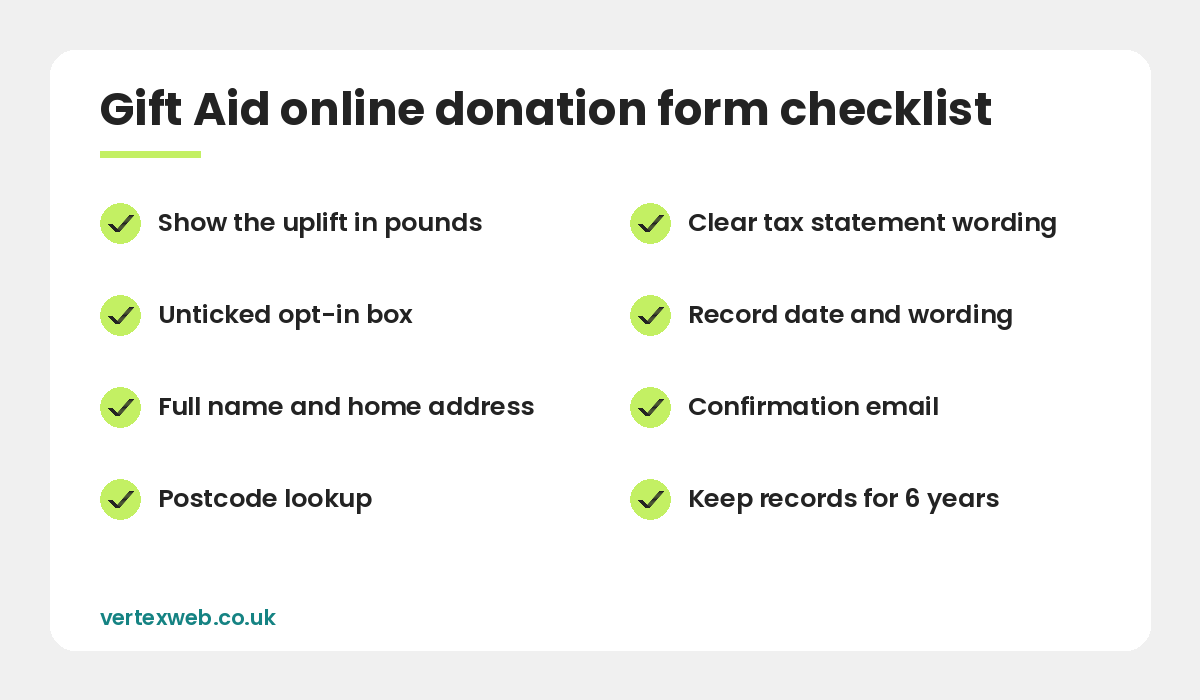
Setting up Gift Aid online donations is mostly about the form. A good donation form should:
- Show the uplift. Next to the amount, say “With Gift Aid, your £20 becomes £25 at no extra cost to you”.
- Use an unticked box. The donor must actively opt in. Never pre-tick it.
- Ask for the address only when needed. Show the full address fields when the box is ticked, with a postcode lookup to cut errors.
- Store the declaration date and wording. Your system should record what the donor agreed to and when.
- Send a confirmation email that repeats the declaration and explains how to cancel or update it.
Keep the form short and fast on mobile. Every extra field or slow page loses donors. If your current site makes this hard, our charity website design service includes a donation journey built around Gift Aid.
Platforms and plugins that support Gift Aid
You do not need custom software. Common options for UK charities include:
- Fundraising platforms such as JustGiving and Enthuse, which collect declarations and can claim Gift Aid for you, usually for a fee.
- CRM and donation tools such as Donorfy or Beacon, which store declarations against supporter records and prepare claim files.
- WordPress plugins such as GiveWP with a Gift Aid add-on, or WooCommerce donation plugins with a Gift Aid field, connected to Stripe or PayPal.
- Gift Aid services such as Swiftaid, which let donors make one declaration that works across many charities.
When comparing tools, check the fees, whether the platform claims on your behalf or gives you the data, and whether you can export declarations if you ever switch provider.
Which donations can and cannot have Gift Aid
Gift Aid can usually be claimed on one-off and regular donations of money from individual UK taxpayers, including sponsorship for a challenge event when the sponsor is giving their own money.
It generally cannot be claimed on:
- Payments for goods or services, such as raffle tickets, event tickets or auction lots.
- Donations from companies, which are handled through Corporation Tax instead.
- Money given on behalf of someone else, such as a collection passed on by a group.
- Donations where the donor gets a benefit worth more than HMRC’s limits.
For cash donations of £30 or less without a declaration, look at the Gift Aid Small Donations Scheme. We explain it in our guide to Gift Aid for mosques, and the same rules apply to other charities with community buildings.
How to claim from HMRC
Claims are made online through Charities Online, either by uploading a spreadsheet using HMRC’s template or through compatible software. Many charities claim monthly or quarterly so the money arrives steadily.
You must keep records showing who donated, how much, when, and their declaration. HMRC asks you to keep declarations for 6 years after the most recent donation you claimed on. Claims generally need to be made within 4 years of the end of the financial period in which the donation was received.
How to get more donors to tick the box
- Explain Gift Aid in one plain sentence near the box.
- Show the extra amount in pounds, not just “25%”.
- Remind supporters who did not tick the box by email after their gift.
- Add Gift Aid prompts to event sign-up and sponsorship pages.
- Test the form on mobile to make sure the box is easy to see and tap.
If you only make one change after reading this, check your donation form wording today. Small fixes to Gift Aid online donations, such as showing the uplift in pounds and adding a postcode lookup, often increase the share of donors who tick the box. HMRC’s Claim Gift Aid guidance is the best place to check the latest rules for Gift Aid online donations.
Common questions
Can Gift Aid be claimed on online donations?
Yes. HMRC accepts declarations made online, as long as they include the charity name, the donor’s full name and home address with postcode, a description of the gift and the required tax statement.
How much does Gift Aid add?
At the 20% basic rate, Gift Aid adds 25p for every £1 donated by a UK taxpayer. A £20 donation becomes £25 for the charity.
Does the Gift Aid box have to be unticked?
Yes. The donor must actively agree to Gift Aid, so the box should start unticked and be clearly explained.
Can I claim Gift Aid on raffle or event tickets?
Generally no. Gift Aid applies to donations, not payments for goods, services or chances to win a prize.
How long should I keep Gift Aid records?
HMRC asks charities to keep declaration records for 6 years after the most recent donation claimed under that declaration.
Final thoughts
Getting Gift Aid online donations right is one of the easiest ways to raise more without asking for more. Use clear declaration wording, an unticked opt-in box, a short mobile-friendly form and a tool that keeps good records. Then claim regularly through Charities Online.
Need a donation page that does this properly? Contact us or see our charity website design service.
Related reading
- Charity and non-profit website design
- Google Ad Grants for Charities: UK Eligibility and How to Apply
- Charity Website Checklist: What Your Site Should Include
- Can Mosques Claim Gift Aid? A Guide for Mosque Trustees
- Online Fundraising Ideas for Small Charities
Turn every £1 into £1.25. VertexWeb builds fast donation pages with Gift Aid declarations, postcode lookup and claim-ready records.