
By the Vertexweb team. Last reviewed October 2026.
Google Ad Grants for charities gives eligible UK charities up to $10,000 a month in free Google Search advertising. That is in-kind ad credit, not cash, and it can put your charity in front of people searching for your cause, your services, volunteering roles and ways to donate.
Many small charities never apply because the rules look complicated, or they apply, run one campaign and then lose the account when performance drops. This guide explains who is eligible in the UK, how to apply step by step, the account rules you must follow and how to turn free clicks into donations, volunteers and enquiries.
Key takeaways
- Eligible charities can receive up to $10,000 of Google Search ads every month. Unused credit does not roll over.
- You need registered charitable status, verification through Percent and a good quality website you own.
- Government bodies, hospitals and healthcare providers, and schools or universities are not eligible.
- Accounts must keep at least a 5% click-through rate and track at least one meaningful conversion.
- The grant works best when every ad sends people to a focused landing page with one clear action.
What is the Google Ad Grant?
The Google Ad Grant is part of Google for Nonprofits. It gives eligible organisations free credit to run text ads on Google Search, the same kind of ads businesses pay for through Google Ads. Your ads appear above or below the organic results when someone searches for a phrase you have chosen, such as “food bank volunteering Manchester” or “donate to a children’s charity”.
The credit is worth up to $10,000 per month, which is roughly $120,000 a year. It only covers Search ads. It does not cover Display, YouTube or Shopping ads, and any credit you do not use in a calendar month is lost.
For a small charity with no marketing budget, that is a significant source of website traffic. The catch is that Google expects you to manage the account properly. Think of it as a free paid search channel that still needs the same care as a paid one.
Who is eligible for Google Ad Grants for charities in the UK?
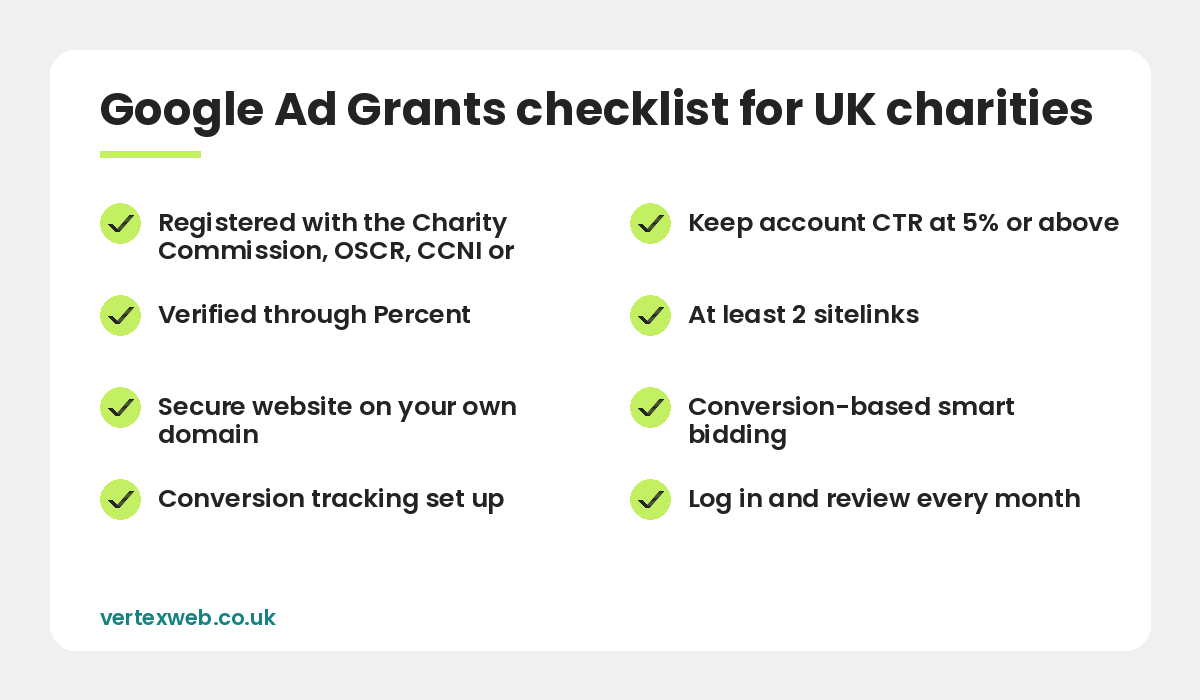
In the UK your organisation must hold current charitable status. Google and its validation partner accept registration with:
- The Charity Commission for England and Wales
- The Office of the Scottish Charity Regulator (OSCR)
- The Charity Commission for Northern Ireland (CCNI)
- HMRC, for exempt charities and organisations recognised as charities for tax purposes
You also need to agree to Google’s non-discrimination policy and to the programme terms. Some types of organisation are not eligible, even if they are charities:
- Government entities and public bodies
- Hospitals and healthcare providers
- Schools, colleges and universities (some separate fundraising arms can apply)
Finally, you need a working website on your own domain. Google reviews it before approving the grant, so a holding page, a broken site or a Facebook page will not pass. If your site needs work first, our guide to what a charity website should include covers the essentials.
How to apply, step by step
- Request a Google for Nonprofits account. Sign in with a Google account that uses your charity email address, not a personal Gmail, and complete the organisation details.
- Get verified by Percent. Percent is Google’s validation partner in the UK. They check your registration number and contact details. This usually takes a few days, longer if your public records do not match what you entered.
- Activate Google Ad Grants. Once verified, open the Google for Nonprofits dashboard and choose Ad Grants. Google will check your website against its policies.
- Set up your Google Ads account. Follow the activation steps Google provides. You will not be asked for billing details because the account is funded by the grant.
- Build your first campaigns. Create at least two campaigns with tightly themed ad groups, relevant keywords, sitelinks and conversion tracking. Submit them for review.
Keep a note of every login and who owns them. Charity staff change, and many organisations lose access to their account because one volunteer set it up on a personal address.
Account rules you must follow
Google sets compliance rules for Ad Grants accounts. Break them for too long and the account is paused. The main ones are:
- 5% click-through rate (CTR). Your account as a whole must keep a CTR of at least 5% each month. Two months in a row below 5% leads to temporary deactivation.
- Conversion tracking. You must track at least one meaningful conversion, such as a donation, a volunteer sign-up, a newsletter sign-up or a contact form, and record at least one conversion a month. Page views and time on site do not count as conversions.
- Smart bidding. Campaigns must use a conversion-based bid strategy such as Maximise conversions.
- Sitelinks. Each account needs at least two sitelink assets.
- Relevant geo-targeting. Show ads only where your services are useful. A local food bank should not advertise nationally.
- Keyword quality. Avoid single-word keywords and very generic terms. Pause keywords with a very low quality score.
- Activity. Log in regularly, make changes when performance drops and respond to Google’s programme surveys.
You can read the full rules in Google’s Ad Grants account management policy.
Campaign ideas that work for charities
The most successful charity accounts match campaigns to the different reasons people search. A good starting structure is:
- Services and support. People looking for help, for example “bereavement support for children” or “free debt advice near me”. These often have high intent and strong CTR.
- Volunteering. Roles, locations and time commitment, for example “volunteer at a charity shop Leeds”.
- Donations and appeals. Branded and cause-related phrases, sent to a fast, simple donation page.
- Awareness and information. Questions about your cause, sent to helpful guides on your website. These grow your audience and newsletter list.
- Events and challenges. Sponsored walks, runs and challenge events, timed around sign-up deadlines.
Write ads that answer the search directly, include your location where it matters and give a clear next step. Use search terms reports to add negative keywords so your grant is not wasted on irrelevant searches. If you also run paid campaigns, our pay per click management team can manage both alongside each other.
Getting your website ready
Free clicks only help if the landing page converts. Before you launch, check that your site:
- Loads quickly on mobile and uses HTTPS.
- Has a clear mission statement and charity number in the footer.
- Has a focused page for each campaign, not just the homepage.
- Has a simple donation form that supports Gift Aid. See our guide on adding Gift Aid to online donations.
- Has Google Analytics 4 and Google Tag Manager installed so conversions are tracked accurately.
Good content also helps. Pages that answer real questions about your cause tend to earn better quality scores and more organic traffic too, which is why Ad Grants and SEO work well together.
Common mistakes that get accounts paused
- Running one broad campaign on the homepage with generic keywords.
- Tracking page views as conversions instead of real actions.
- Ignoring the account for months until a suspension email arrives.
- Using broad keywords like “charity” or “donate” on their own.
- Sending ads to pages that are slow, outdated or have no clear call to action.
If your account has been deactivated, fix the cause, such as low CTR or missing conversions, then request reinstatement from the Ad Grants help centre.
Before you apply, read Google’s own overview of Google Ad Grants. In short, Google Ad Grants for charities rewards organisations that keep the account active, track real conversions and build campaigns around genuine search demand. Run well, Google Ad Grants for charities can become your largest single source of new website visitors.
Common questions
How much is the Google Ad Grant worth?
Eligible charities can receive up to $10,000 a month in Google Search advertising credit. It is in-kind ad spend rather than cash, and unused credit does not carry over to the next month.
Is the Google Ad Grant free?
Yes. There is no charge from Google for the grant. You only pay if you hire someone to set up or manage the account, or if you choose to run a separate paid Google Ads account.
How long does it take to get approved?
Verification with Percent often takes a few days. Google then reviews your website and account set-up, so allow a few weeks from start to live ads.
Can a small charity use the Ad Grant?
Yes. There is no minimum income. Many small and local charities use the grant well by focusing on local services, volunteering and a small number of strong landing pages.
Why was my Ad Grants account deactivated?
The most common reasons are an account CTR below 5% for two months in a row, missing or invalid conversion tracking, or not responding to programme requirements. Fix the issue and request reinstatement.
Final thoughts
Google Ad Grants for charities is one of the best free marketing resources available to UK charities, but it rewards organisations that treat it seriously. Check your eligibility, get verified by Percent, prepare focused landing pages and build campaigns around the real reasons people search for you. Then review the account every month.
Want help? We build charity websites that are ready for Ad Grants and can set up and manage campaigns for you. Contact us for a free review.
Related reading
- Charity and non-profit website design
- How to Add Gift Aid to Online Donations
- Charity Website Checklist: What Your Site Should Include
- Online Fundraising Ideas for Small Charities
- Social Media for Small Charities: A Practical Strategy
Make your free $10,000 a month count. VertexWeb builds fast charity websites and sets up Ad Grants campaigns that track real donations and sign-ups.