By the Vertexweb team. Last reviewed 4 October 2026.
No one can guarantee that a blog post will rank on Google, but you can greatly improve your chances by matching search intent, giving clearer and more original answers than existing pages, and making the post easy to find and use. Ranking is not about tricks or hitting a word count. It is about being the most helpful result for a particular search.
This guide walks through the process we recommend: understanding intent, researching keywords and competitors, structuring the article, showing real experience, optimising the page, linking internally and improving over time.
Key takeaways
- Start with the reader’s intent, not the keyword alone.
- Study what already ranks, then add what is missing: clarity, examples, accuracy and originality.
- Use clear headings, direct answers and helpful visuals.
- Link related pages together and keep content accurate and updated.
- Measure impressions, clicks and enquiries, and improve based on evidence.
Step 1: Understand search intent
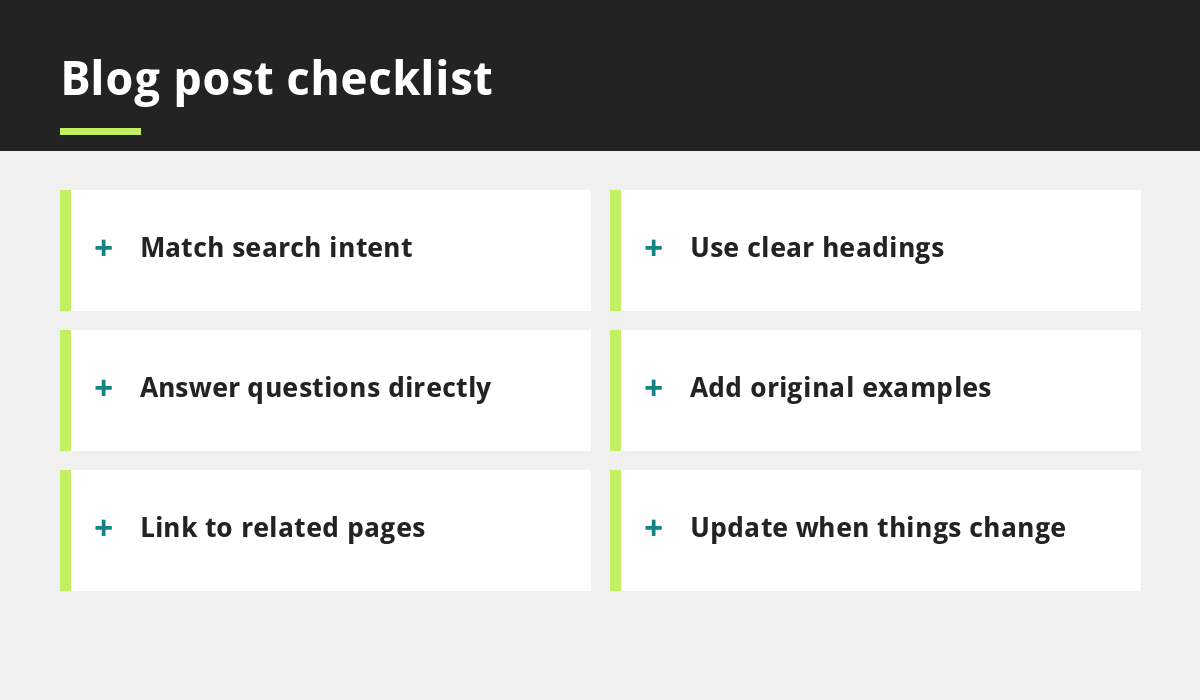
Search intent is what the person actually wants. Some searches are informational, such as how to prepare for a physiotherapy appointment. Some compare options, such as best booking system for salons. Some are local or transactional, such as hair salon near me. Search for your topic yourself and see which formats appear: guides, lists, product pages, videos or maps. Write the format that matches what people clearly want.
Step 2: Research keywords and questions
Choose a primary topic phrase and related terms that customers use. Look at autocomplete suggestions, related searches and the People Also Ask boxes for common questions. Use natural language and cover the subtopics that belong to the subject. Do not force the same phrase into every heading. If you already have a page targeting the same intent, improve it rather than writing a competing one.
Step 3: Study the pages already ranking
Read the top results. Note what they cover, how they structure information, what they miss and where they are outdated or unclear. Your goal is not to copy them, but to produce something more useful through better explanation, original examples, clearer structure and accurate sourcing.
Step 4: Structure the article
- A clear title that accurately describes the content.
- A short introduction that answers the main question quickly.
- Descriptive headings that follow the reader’s questions.
- Short paragraphs, lists and tables where they help.
- A concluding section with the next step.
Where a question has a short answer, give it directly and then explain further. This helps readers and helps search and answer engines understand your content.
Step 5: Show real experience and expertise
Google’s guidance emphasises helpful, reliable, people-first content. Show that you know the subject: use real examples from your work, explain how you do things, name the sources you rely on and be honest about limits. Never invent statistics, reviews, qualifications or case studies. If a topic affects health, money or safety, apply an extra high standard of evidence.
Step 6: Optimise the page
Write a unique title and meta description that accurately describe the page, use a clean URL and add descriptive alt text to images. Compress images so the page loads quickly, and make sure it works on phones. See why your business needs a mobile-first website and our speed guide.
Step 7: Link related pages together
Add natural internal links to relevant guides and service pages, using descriptive anchor text. For example, an article on local visibility could link to our local SEO guide and to our SEO services. Link from older relevant posts back to the new one.
Using AI tools carefully
AI can help with outlines and editing, but never publish raw AI output. Check facts, add your own experience and rewrite generic phrasing. Our article on using AI tools without losing the human touch explains a sensible workflow.
Step 8: Measure and update
After publishing, watch impressions, clicks, average position and enquiries in your analytics and search tools. If a page gets impressions but few clicks, improve the title and description. If it ranks on the second page, improve depth, clarity and internal links. Update posts when information changes, and avoid changing dates without real updates. Our guide to content marketing covers planning and measurement.
Common blog mistakes
- Writing for a keyword instead of a person.
- Publishing thin posts that repeat what everyone says.
- Targeting the same intent with several posts.
- Skipping internal links and images.
- Never updating old posts.
- Believing promises of guaranteed rankings.
Example: planning a post for a local salon
This is an illustration of the method. A salon wants to write about balayage. It searches the topic and notices that top results mix explainers, price guides and local pages. It lists real customer questions such as how long the appointment takes, how often to return and how to care for colour. It then writes one clear guide that answers these in order, adds its own photos with client permission, includes a starting price range for its own services, links to its booking page and to its salon website guide and checks the page on a phone. After publishing, it reviews impressions and clicks in a few weeks and improves the title if clicks are low.
Common questions
How long should a blog post be to rank?
There is no required length. A post should be as long as it needs to be to answer the question completely. Many in-depth guides run to a thousand words or more, but never add filler to reach a number.
How long does it take for a blog post to rank?
It varies widely. Some posts gain impressions within weeks, while competitive topics can take months and may not rank without ongoing improvement.
Final thoughts
Writing blog posts that can rank on Google comes down to helping people better than the alternatives: match intent, show real expertise, structure clearly, optimise sensibly and keep improving. There are no guarantees, but there is a reliable process.
If you want expert support, see our content making services or contact the team.
Related reading
- Why Content Marketing Is Still the Backbone of Online Growth
- How Content Writers Can Harness AI Tools
- How Local SEO Helps UK Businesses
- A Beginner’s Guide to Social Media Marketing
Launch offer for UK small businesses. Get a professional website for just £299 a year. Only the first 20 customers, for restaurants, small clinics and small businesses.